Your order could be in a couple of places... our warehouse, awaiting dispatch, with the courier on its way, or delivered. The first thing to check is have you had your dispatch email? If yes, then it's on its way. You can track your order at the top of this page using your order number from that email. If you haven't got your dispatch email (don't forget to check those junk folders) then your order is waiting to leave us. Once you have the dispatch email you can track it yourself via the link in the email or by using the track my order section at the top of this page.
If you don't have your order number with you, you can get it by logging into your account here and then by going to 'Order History'.
1. How do I change my email address?
We understand the importance of ensuring the security of your account information, and therefore, we do not allow direct changes to email addresses. We prioritize the safety and protection of our customers' data. If you wish to use a different email address for your Fidele account, we kindly ask you to create a new account using your preferred email. It's a quick and easy process that only takes a minute. Your security and peace of mind are important to us.
2. How do I change my delivery address?
We've made it incredibly simple for you to update your address. Just log into your Fidele account, navigate to the "addresses" section, and you'll have the option to add a new address or edit an existing one. However, please note that once an order has been placed, we are unable to modify the delivery address. So make sure to double-check your address before confirming your order. We want to ensure a smooth and seamless shopping experience for you.
3. How do I change my contact preferences?
We respect your preferences and want to ensure that we communicate with you in a way that suits you best. If you wish to change your contact preferences and decide not to receive updates about our latest offers and upcoming news from Fidele, simply log into your account, go to 'Contact Preferences,' and leave the checkboxes unticked. It's as simple as that! We want to make sure you have full control over how and when we reach out to you.
4. How do I change my password?
To change your password, simply log into your Fidele account using your current password. Under the account information section, you'll find the option to update your password.
If you've forgotten your password, don't worry! Just click on the 'Forgotten Password' link on the account login page, and we'll guide you through a quick and easy password reset process. If you encounter any issues, please reach out to us by visiting the Contact Us tab on this page. We're here to help!
5. How do I change my payment details?
Misplaced your bank card after a fun night out? No worries, it happens to the best of us. To update your payment details, simply log into your Fidele account, navigate to the payment details section, and you'll have the option to add, delete, or edit your payment options. We've got you covered!


Lorem ipsum dolor sit amet, consectetur adipisicing elit, sed do eiusmod tempor incididunt ut labore et dolore magna aliqua. Ut enim ad minim veniam, quis nostrud exercitation ullamco laboris nisi ut aliquip ex ea commodo consequat.
Lorem ipsum dolor sit amet, consectetur adipisicing elit, sed do eiusmod tempor incididunt ut labore et dolore magna aliqua. Ut enim ad minim veniam, quis nostrud exercitation ullamco laboris nisi ut aliquip ex ea commodo consequat.

| Size | Chest(cm) | Neck(cm) |
|---|---|---|
| XS | 86-91 | 38.5 |
| S | 91-97 | 39.5 |
| M | 97-102 | 41.5 |
| L | 102-107 | 43.5 |
| Size | VN | UK | US | CA | AU |
|---|---|---|---|---|---|
| XS | 91 CM | Chest 36 | Chest 36 | Chest 36 | Chest 36 |
| S | 97 CM | Chest 38 | Chest 38 | Chest 38 | Chest 38 |
| M | 102 CM | Chest 40 | Chest 40 | Chest 40 | Chest 40 |
| L | 107 CM | Chest 42 | Chest 42 | Chest 42 | Chest 42 |
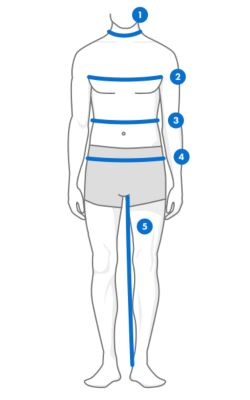
1. Neck - Measure around neck base where shirt fits.
2. Chest - Measure around fullest part with arms lowered for the most accurate measurement. Make sure the tape is flat across the back.
3. Waist - Measure around the narrowest point on the waistline.
4. Hips - Feet together, measure around the fullest part.
5. Inside Leg - Measure from highest point at crotch to ankle bone.